

When building enterprise applications, we often start with a simple CRUD approach. It works fine until it faces some issues and system grows more we may encounter several challenges.
As systems grow, business rules become complex, read traffic increases, and scalability becomes critical the traditional “one model for everything” approach starts to show cracks.
That’s where CQRS (Command Query Responsibility Segregation) comes in and resolves these issues.
In this article, I’ll walk you through:
- What CQRS really means in simpler way
- Why it matters in real-world systems
- How to implement it using MediatR in .NET 10
- Clean project structure
- Practical tips from production experience
What is CQRS (Command Query Responsibility Segregation)?
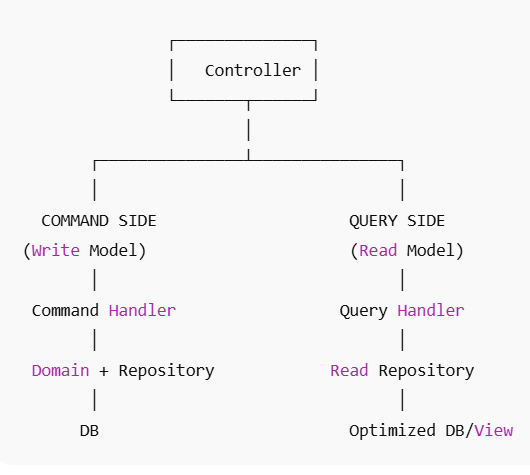
CQRS is a design pattern that separates read operations (queries) from write operations (commands) in an application.
Instead of using the same model for both reading and writing data, CQRS splits them into two different models:
- Command Model → Handles writes (Create, Update, Delete)
- Query Model → Handles reads (Fetch, Search, Get)
This improves scalability, maintainability, and clarity in complex systems.
CQRS separates read operations from write operations. We never mix command and queries.
Basic Idea
Traditional CRUD approach:
Controller → Service → Repository → Database
CQRS approach:
Command → Command Handler → Domain → Database
Query   → Query Handler   → Read Model → Database
Visual Understanding
Why Use CQRS?
Let’s think practically. In most applications:
- Reads happen far more than writes.
- Reads need performance.
- Writes need validation and business rules.
Trying to optimize both using the same model leads to complexity.
CQRS allows:
- Separate scaling of reads & writes
- Optimized read models
- Cleaner business logic
- Better testability
- Clear architectural boundaries
If you’re already using Clean Architecture CQRS fits naturally.
1. Clear Separation of Concerns
Reads and writes have different responsibilities.
2. Scalability
- Read traffic can scale independently
- Write side can have complex business logic
- Read side can use caching or projections
3. Performance Optimization
- Read models can be optimized for UI
- Write models focus on business rules
4. Works Great with:
- Clean Architecture (which you’re already using)
- MediatR
- Event Sourcing
- Microservices
Where MediatR Fits In
MediatR is a lightweight mediator library that helps implement CQRS cleanly.
Instead of controllers directly calling services:
Controller → Service → Repository
We do:
Controller → MediatR → Handler
Each request (command/query) has exactly one handler.
This removes tight coupling and improves maintainability.
Project Structure (.NET 10 Web API)
A clean CQRS structure typically looks like:
Application
 ├── Commands
 ├── Queries
 ├── Handlers
Domain
Infrastructure
API (Controllers)
This aligns perfectly with Clean Architecture principles.
Step-by-Step: CQRS with MediatR in .NET 10
Create a new WebAPI project in .NET 10 or you can you your existing project and implement CQRS with MediatR in .NET 10
Then you will follow the below.
Install Required Packages
dotnet add package MediatR
dotnet add package MediatR.Extensions.Microsoft.DependencyInjection
dotnet add package Microsoft.EntityFrameworkCore.SqlServer
Register MediatR in Program.cs
builder.Services.AddMediatR(cfg =>
    cfg.RegisterServicesFromAssembly(typeof(Program).Assembly));
That’s it. Clean and simple.
Implementing Command Side (Write Model)
Example: Create Booking
Add a new record CreateBookingCommand
public record CreateBookingCommand(
    string GuestName,
    DateTime CheckIn
) : IRequest<Guid>;
Note:
- It represents an intention.
- It returns only the ID (not full object).
- It changes system state.
Now, let’s create a new CreateBookingCommandHandler class
public class CreateBookingCommandHandler
    : IRequestHandler<CreateBookingCommand, Guid>
{
    private readonly AppDbContext _context;

    public CreateBookingCommandHandler(AppDbContext context)
    {
        _context = context;
    }

    public async Task<Guid> Handle(
        CreateBookingCommand request,
        CancellationToken cancellationToken)
    {
        var booking = new Booking
        {
            GuestName = request.GuestName,
            CheckIn = request.CheckIn
        };

        _context.Bookings.Add(booking);
        await _context.SaveChangesAsync(cancellationToken);

        return booking.Id;
    }
}- Key principle:
- Commands contain business logic.
- They modify state.
- They should not contain read logic.
Implementing Query Side (Read Model)
Now we separate the read logic.
Let’s create a record class for GetBooking
public record GetBookingByIdQuery(Guid Id) : IRequest<BookingDto>;<br>Note:
- It does not change state.
- It returns data.
- It can be optimized for UI.
Now, let’s create GetBookingByIdQueryHandler class
public class GetBookingByIdQueryHandler
    : IRequestHandler<GetBookingByIdQuery, BookingDto>
{
    private readonly AppDbContext _context;

    public GetBookingByIdQueryHandler(AppDbContext context)
    {
        _context = context;
    }

    public async Task<BookingDto> Handle(
        GetBookingByIdQuery request,
        CancellationToken cancellationToken)
    {
        return await _context.Bookings
            .AsNoTracking()
            .Where(x => x.Id == request.Id)
            .Select(x => new BookingDto
            {
                Id = x.Id,
                GuestName = x.GuestName,
                CheckIn = x.CheckIn
            })
            .FirstOrDefaultAsync(cancellationToken);
    }
}
Important:
AsNoTracking()improves performance.- We project directly to DTO.
- We don’t return domain entities.
Controller Usage
Controllers become thin.
[ApiController]
[Route("api/bookings")]
public class BookingsController : ControllerBase
{
    private readonly IMediator _mediator;

    public BookingsController(IMediator mediator)
    {
        _mediator = mediator;
    }

    [HttpPost]
    public async Task<IActionResult> Create(CreateBookingCommand command)
    {
        var id = await _mediator.Send(command);
        return Ok(id);
    }

    [HttpGet("{id}")]
    public async Task<IActionResult> Get(Guid id)
    {
        var result = await _mediator.Send(
            new GetBookingByIdQuery(id));

        if (result == null)
            return NotFound();

        return Ok(result);
    }
}
Now the controller:
- Does NOT contain business logic.
- Does NOT talk to database.
- Only delegates.
This is clean architecture in action.
Improvements (Production Ready)
In real systems, you usually add:
- Validation Pipeline Behavior
Use FluentValidation with MediatR pipeline.
- Logging Behavior
Centralized logging without polluting handlers.
- Transaction Behavior
Wrap command handlers in transactions.
- Separate Read Database
In high-scale systems:
- Write DB → normalized
- Read DB → denormalized / optimized
When Should You Use CQRS?
Use CQRS pattern when:
- Business logic is complex
- System is growing
- Performance matters
- You follow Clean Architecture
- Multiple teams work on the system
Avoid it when:
- Small CRUD app
- Simple internal tool
- Overengineering risk
CQRS adds structure — and structure adds complexity.
Use it wisely.
Key Takeaways
- CQRS separates reads and writes.
- Commands change state.
- Queries return data.
- MediatR makes implementation clean and decoupled.
- Controllers become thin.
- Handlers become focused and testable.
- Scaling becomes easier.
Conclusion
CQRS helps you build clearer, more maintainable systems by separating reads from writes. When combined with MediatR in .NET 10, it promotes clean architecture, focused handlers, and thin controllers making your code easier to test, scale, and evolve.
While it may be unnecessary for small CRUD apps, CQRS becomes highly valuable in complex or growing systems. When it is used wisely, it provides a solid foundation for building modern, scalable enterprise applications.
 Rijwan Ansari