
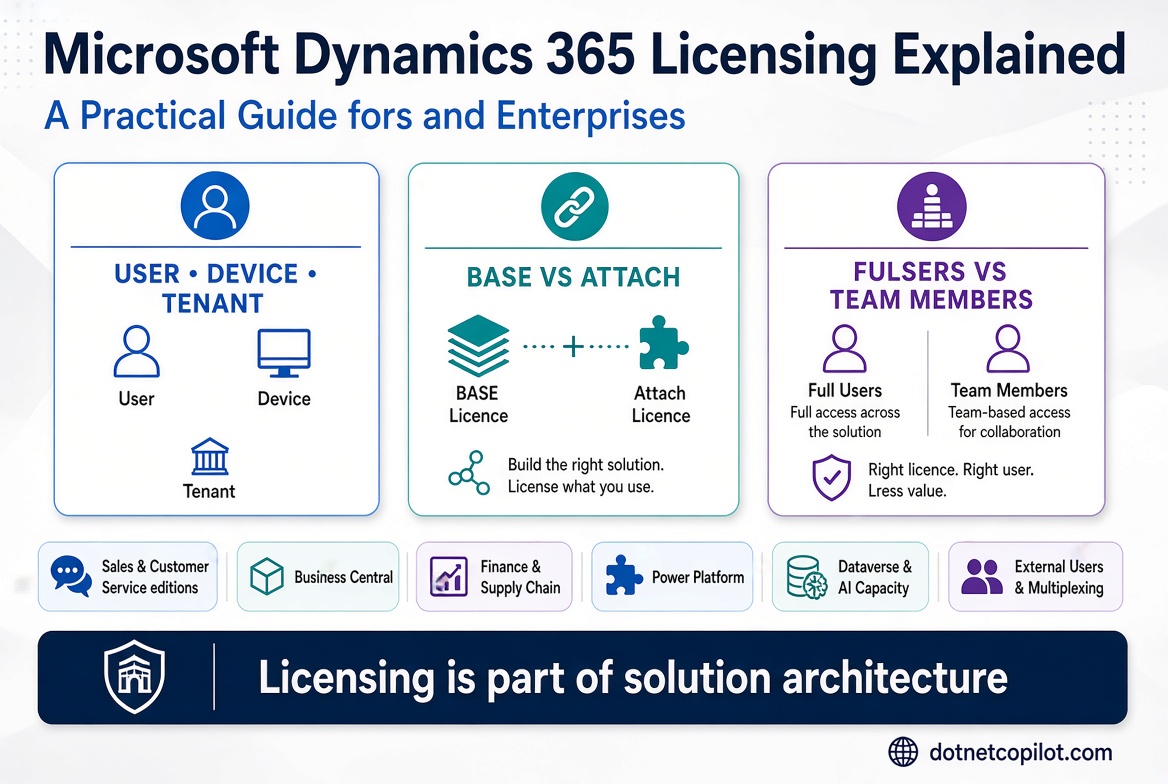
How licensing works, what it costs, and how to design a cost-effective model for SMEs and enterprises
Microsoft Dynamics 365 licensing is not simply a matter of counting users and multiplying by a monthly subscription price. It is a combination of application licensing, user and device access, capacity entitlements, attach rights, tenant-level services, add-ons, and contractual purchasing rules.
A technically sound architecture can still become commercially unsustainable if the licensing model is misunderstood. Equally, an organisation can overpay by assigning full application licences to users who only need limited capabilities.
This article is structured to help solution architects, enterprise architects, IT leaders, procurement teams, and implementation partners understand the licensing landscape before designing or purchasing a Dynamics 365 solution.
Important pricing note: Microsoft licensing and commercial terms can change by market, agreement, currency, and purchase channel. I’ll distinguish list-price examples from contractual pricing and call out where a quote must be validated against the organisation’s country and agreement. The article is an architectural and planning reference, not a substitute for the applicable Product Terms and licensing agreement.
First understand the three main licence types
Think of Dynamics 365 licensing in three simple categories.
| Licence type | What it means | Example |
|---|---|---|
| User licence | Assigned to a named person | A sales representative using Dynamics 365 Sales |
| Device licence | Assigned to a dedicated shared device | A warehouse terminal used by different shifts |
| Tenant / capacity licence | Covers a tenant-level service or a defined amount of consumption | Customer Insights capacity or additional storage |
Most CRM and ERP users need a user licence. Device licences are appropriate only where the product’s device licensing terms cover the actual scenario. Tenant and capacity subscriptions cover different things; they do not automatically give every employee full application access.
Which Dynamics 365 products are available?
The easiest way to understand the portfolio is to group products by business function.
Sales and customer engagement
- Sales Professional
- Sales Enterprise
- Sales Premium
- Customer Service Professional
- Customer Service Enterprise
- Customer Service Premium
- Contact Center
- Field Service
Small and medium business ERP
- Business Central Essentials
- Business Central Premium
- Business Central Team Members
- Business Central Device
Enterprise ERP
- Finance
- Finance Premium
- Supply Chain Management
- Supply Chain Management Premium
- Commerce
- Human Resources
- Project Operations
Related platform services
- Power Apps
- Power Automate
- Power Pages
- Copilot Studio
- Dataverse capacity
You do not need to buy the entire Dynamics 365 suite. You license the applications and capabilities your business needs.
Base licence and Attach licence — explained with an example
This is one of the most useful concepts for organisations using more than one Dynamics 365 application.
- Base licence: The primary, highest-priced required application licence assigned to a named user.
- Attach licence: A lower-priced additional application licence for the same user, but only where Microsoft permits that exact base/attach combination.
A user can have more than one attach licence. Attach licences provide the same core application capabilities as the corresponding base licence; the difference is the commercial price.
Example: an employee works in Sales and Customer Service
Suppose an employee needs both Sales Enterprise and Customer Service Enterprise.
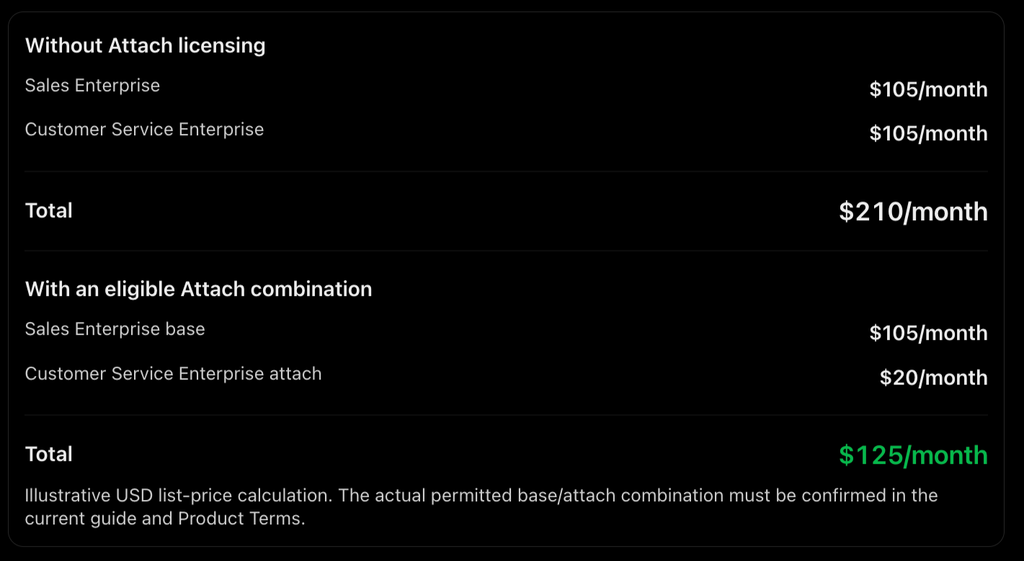
The saving is $85 per user per month, or $1,020 per year. For 30 eligible users, that is $30,600 per year.
Important: Do not assume Sales Enterprise can be the base for every other Dynamics 365 product. Check the attach matrix in the guide. The base licence must also satisfy the highest-priced required application rule.
What do the main licences cost?
The reference gives the following USD list-price references, billed annually. These are useful for planning, not guaranteed local prices. Taxes, country, purchasing channel, agreement discounts, and price changes can affect the actual quote.
Customer engagement and ERP price comparison
| Product | Licence | USD per user/month |
|---|---|---|
| Sales | Professional | $65 |
| Sales | Enterprise | $105 |
| Sales | Premium | $150 |
| Customer Service | Professional | $50 |
| Customer Service | Enterprise | $105 |
| Customer Service | Premium | $195 |
| Contact Center | Digital | $95 |
| Contact Center | Voice | $95 |
| Contact Center | Digital + Voice | $110 |
| Field Service | Full user | $105 |
| Field Service | Contractor | $50 |
| Business Central | Essentials | $80 |
| Business Central | Premium | $110 |
A few points to remember:
- Sales Professional and Sales Enterprise have different capabilities. Professional is designed for simpler sales processes; Enterprise provides more advanced extensibility and sales capabilities.
- Sales Premium adds capabilities such as advanced sales engagement and AI-powered data enrichment.
- Customer Service Professional is for simpler case-management requirements. Enterprise is for more advanced service operations.
- Contact Center Digital + Voice is a bundle. It is not necessary to purchase Digital and Voice separately if the combined option meets the requirement.
- Field Service Contractor has restricted capabilities and does not include the Dataverse capacity entitlements of the full Field Service licence.
- Business Central Premium includes Essentials capabilities plus manufacturing and service management.
Enterprise ERP prices
Finance and Supply Chain Management have standard and Premium editions. The Premium editions are for users who need the additional business performance management or demand planning capabilities. The exact current commercial price and any minimum purchase requirements should be confirmed in the Microsoft’s product pricing section and Product Terms before procurement. cdn-dynmedia-1.microsoft.com+1
Example: 50 Customer Service agents
Suppose a company has 50 agents.
| Edition | Monthly cost | Annual cost |
|---|---|---|
| Customer Service Professional | $2,500 | $30,000 |
| Customer Service Enterprise | $5,250 | $63,000 |
| Customer Service Premium | $9,750 | $117,000 |
Calculation: licence price × 50 users × 12 months. USD, before tax and discounts.
The key question is not “Which edition is best?” It is “Which edition contains the capabilities our agents actually need?”
Team Members — when can you use a cheaper licence?
This is where many organisations can optimise cost, but it is also where mistakes happen.
A Team Members licence is for users who need limited access. It is not a cheaper version of a full Sales, Customer Service, Finance or Supply Chain licence.
Example: a sales manager
Imagine a sales manager who only needs to:
- Read sales records.
- Review dashboards.
- Update their own information.
- Approve permitted activities.
A Team Members licence may be appropriate if the exact activities are within its documented rights.
But if the manager creates and manages opportunities, performs full sales activities, or uses restricted application functionality, a full Sales licence may be needed.
Example: a customer service supervisor
A supervisor who only reads permitted information and performs limited activities may qualify for Team Members. A supervisor who manages cases, works queues, or performs full agent operations may need Customer Service Enterprise.
Two different Team Members licences
| Licence | Used with | Important distinction |
|---|---|---|
| Dynamics 365 Team Members | Sales, Customer Service, Finance, SCM and other supported applications | Limited use rights defined by application |
| Business Central Team Members | Business Central | Its own specific read, update, approval and quote rights |
Do not confuse these two licences.
The Business Central Team Members licence allows activities such as reading data, updating certain existing records, approving permitted workflows, and creating or editing sales or purchase quotes. The Dynamics 365 Team Members licence has a different set of rights, including permitted activities, approvals, and self-service operations. cdn-dynmedia-1.microsoft.com
What about Operations – Activity?
For Finance, Supply Chain Management, Commerce and related enterprise workloads, Microsoft also provides an Operations – Activity licence.
It provides more functionality than Team Members, including defined approval, warehouse, receiving, shipping, order, vendor maintenance and budget activities. It can also cover operation of specified POS, warehouse and production-floor devices.
Example: A warehouse employee who receives stock and performs permitted warehouse operations may need Operations – Activity rather than a full Supply Chain Management licence.
The correct licence must be selected by mapping the employee’s actual operations to the security-role and entitlement tables in the article. Click Here
Device licences — when should you use them?
A device licence is useful when multiple people share a dedicated device to perform a defined business task.
Examples:
- A retail POS terminal.
- A warehouse terminal.
- A production-floor device.
- A dedicated customer service workstation.
Example: retail store
A store has 20 employees working in shifts but only 5 dedicated POS terminals. A suitable device licensing model may be more appropriate than licensing each employee with a full application licence, depending on the product and the operations performed.
Microsoft’s guide identifies full-access device licences for products including Sales, Customer Service, Field Service, Operations and Business Central. Some products also have restricted device options. A device licence is not a universal substitute for a named-user licence.
Customer Service and Contact Center — understand the difference
This is especially important for organisations building a customer service platform.
| Requirement | Licence to evaluate |
|---|---|
| Basic case management and knowledge | Customer Service Professional |
| Advanced case management and service operations | Customer Service Enterprise |
| Digital messaging and chat contact centre | Contact Center Digital |
| Native voice contact centre | Contact Center Voice |
| Digital and voice contact centre | Contact Center Digital + Voice |
| Combined CRM and contact centre experience | Customer Service Premium |
Example: a bank with 100 service agents
Suppose:
- 60 agents handle cases and email.
- 25 agents handle digital chat and messaging.
- 15 agents handle both voice and digital channels.
A possible starting point is:
- Customer Service Enterprise for agents needing advanced case management.
- Contact Center Digital add-on for agents needing digital engagement.
- Contact Center Voice or Digital + Voice for the voice team.
- Customer Service Premium for users who need the bundled CRM and contact centre capabilities.
The exact combination must be checked against the guide and the users’ actual entitlements. Do not buy Customer Service Premium and then separately purchase the same Contact Center Digital + Voice bundle for those same users without a specific reason.
Important entitlement detail: Customer Service Enterprise includes 2,000 Customer Voice responses per user/month. Customer Service Premium does not include that Customer Voice entitlement. Premium includes 1,000 Copilot Credits per user/month for eligible Dynamics 365 agents and tools; the other Customer Service editions do not include that same credit allocation.
Business Central — a practical SME example
Business Central is often a good fit for SMEs that need finance, purchasing, sales, inventory and operations in one system.
| Edition | Price | Main capabilities |
|---|---|---|
| Essentials | $80/user/month | Finance, sales, purchasing, inventory, warehouse and project management |
| Premium | $110/user/month | Essentials plus manufacturing and service management |
Example: a distribution company with 25 employees
- 8 finance, purchasing and sales users need Essentials.
- 2 operations users need Premium because they require manufacturing or service management.
- 15 employees need only limited access and may be eligible for Business Central Team Members.
Illustrative monthly cost, using the Microsoft’s price references:
(8×80) + (2 x 110) + (15 x 8) = $1,100
Annual cost: $13,200.
The $8 Team Members price in this illustration is an assumed price reference from the previous article, not a figure I have independently verified in the supplied November guide. Confirm the current price in Microsoft’s Business Central pricing page before using this calculation in a proposal. The licence eligibility itself must also be checked against each user’s tasks.
Power Platform — do Dynamics 365 licences include it?
Dynamics 365 licences include certain Power Apps and Power Automate use rights, but they do not provide unlimited access to every Power Platform feature.
| Service | What to check |
|---|---|
| Power Apps | Whether the user needs a custom app, premium connector or restricted Dynamics 365 table |
| Power Automate | Whether the flow needs premium connectors, process licensing or unattended RPA |
| Power Pages | Authenticated and anonymous external-user capacity |
| Dataverse | Database, file and log capacity |
| Copilot Studio | Copilot Credit consumption and agent requirements |
Use case: custom employee application
An organisation builds a Power App for employees to submit equipment requests.
If it uses custom Dataverse tables and the user has the required Power Apps or included use rights, that may be covered by the relevant platform entitlement.
However, if the app also lets users perform operations on restricted Dynamics 365 tables, the corresponding Dynamics 365 application licence may be required.
Use case: automated invoice approval
A flow that uses premium connectors or operates as a process independently of an individual user’s entitlement may require Power Automate Premium or a Process licence, depending on the execution model.
Do not assume that a Dynamics 365 licence automatically covers every premium connector or unattended automation scenario.
External users — customers, suppliers and contractors
External-user licensing is often misunderstood.
The November 2026 guide defines external users as people who are not employees or affiliates, and who do not fall into specified contractor or agent categories. It specifically identifies contractors who typically work more than 30 hours per week on average, or who typically work onsite each working day, as outside the external-user definition.
Practical examples
| Person | General licensing treatment |
|---|---|
| A customer submitting a service request | May qualify as an external user |
| A supplier checking order information | May qualify as an external user |
| An employee | Internal user; requires appropriate licensing |
| A contractor working onsite every working day | Treated as an internal user under the Micrsoft guide’s definition |
| A contractor working more than 30 hours per week on average | Treated as an internal user under the Microsoft guide’s definition |
| A vendor performing business processes on the company’s behalf | Internal-user licensing requirements apply |
There is an important restriction: qualifying external users cannot simply be given access to the standard graphical interfaces of Business Central, Sales, Customer Service, Field Service or Project Operations.
For external customer or supplier experiences, consider Power Pages and validate the Power Platform external-user licensing rules.
Example: customer self-service portal
A bank wants customers to:
- Submit service requests.
- Upload supporting documents.
- Track request status.
- Update contact details.
A Power Pages portal may be a suitable architecture. Customers do not need to be assigned the same internal Customer Service agent licence merely to use a qualifying external portal scenario. However, portal capacity and Power Platform use rights must be assessed.
Multiplexing — can an integration or API reduce licences?
No. An integration layer does not automatically remove licensing requirements.
Multiplexing means using software or hardware to pool connections, route information, or reduce the number of users or devices directly connecting to Dynamics 365.
Microsoft’s guide explicitly says multiplexing does not reduce the number of licences required.
Example: one API account for 500 employees
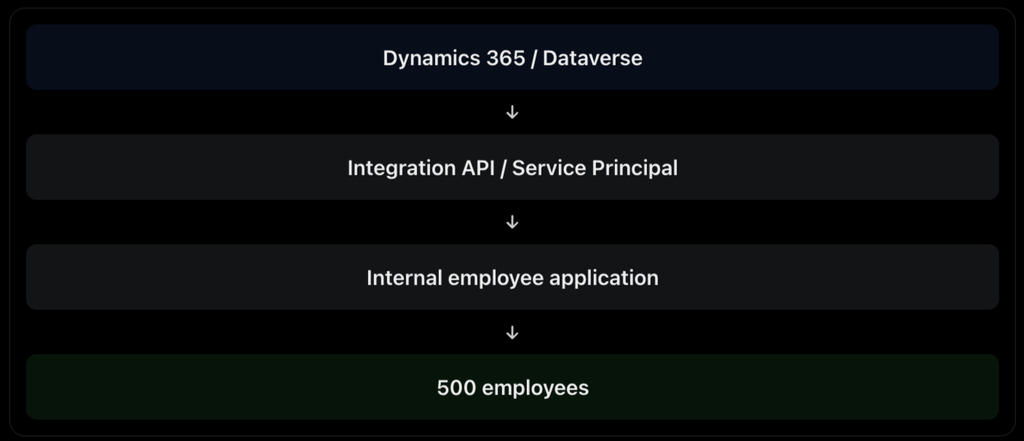
Using one service principal to connect to Dataverse does not mean that 500 internal employees can access Dynamics 365 functionality without appropriate licences.
Architect’s rule: Evaluate the people and devices benefiting from the application, not just the identity used by the API.
Dataverse storage and capacity
Licensing also includes capacity entitlements. Storage is not unlimited. For Dataverse-based Dynamics 365 applications, understand three types:
| Storage | What it contains | Example |
|---|---|---|
| Database | Structured records and data | Cases, contacts, accounts |
| File | Attachments and documents | Emails, PDFs, images |
| Log | Audit and related logs | Audit history and system logs |
Example: Customer Service implementation
A company has:
- 100 Customer Service Enterprise users.
- 10 million case records.
- Large email attachments.
- Extensive audit history.
The architecture team should estimate:
- Database storage for records.
- File storage for attachments.
- Log storage for audit and logging.
- Growth over three to five years.
- Retention and archival requirements.
Do not assume that each additional application licence adds another full set of tenant capacity. The model distinguishes base and attach entitlements, and attach licences generally do not add additional platform entitlements.
Copilot and AI credits — are they included?
Not all AI features are included in the same way.
The November 2026 guide identifies 1,000 Copilot Credits per user/month with certain Premium licences:
| Application | Licence | Included Copilot Credits |
|---|---|---|
| Sales | Sales Premium | 1,000/user/month |
| Customer Service | Customer Service Premium | 1,000/user/month |
| Finance | Finance Premium | 1,000/user/month |
| Supply Chain | SCM Premium | 1,000/user/month |
The Microsoft states that these credits accrue at tenant level and should be allocated to environments to control which workloads consume them.
Other editions do not include the same allocation. For example, Contact Center and Customer Service Enterprise require Copilot Credits to be purchased separately for applicable agent usage.
Example: AI-powered customer service
A company has 50 Customer Service Premium users.
The included allocation is:
50 x 1,000 = 50,000
That is 50,000 Copilot Credits per month, subject to the Microsoft’s allocation and consumption rules.
If the organisation builds additional agents in Copilot Studio or uses more credits than the included entitlement, it must assess additional credit packs, pre-purchase plans or pay-as-you-go consumption.
Important: Copilot Credits are not the same as unlimited Copilot usage. The credits consumed depend on the agent action and workload. Users also need the appropriate underlying application licence for the business data and services they access.
Environments, development and administration
A common misunderstanding is that licensing a production application automatically makes every environment and every development activity free.
The article describes product-specific environment and capacity entitlements.
For example:
- Business Central licences include one production and three non-production environments, subject to the conditions.
- Additional Business Central environments and capacity can be purchased.
- Finance and Operations workloads have separate non-production sandbox add-on options.
- Developers and testers must be assessed against the relevant development and testing requirements.
Administrator licensing
Users with the Power Platform Administrator or Dynamics 365 Administrator role in Entra ID do not require a licence for those administrative roles. Dataverse and Finance and Operations System Administrator roles are also exempt for configuration and administration.
This is not a general exemption for business usage. If an administrator also performs sales, service, finance or other business operations, those activities must be licensed appropriately.
Five practical licensing scenarios
These examples bring the rules together.
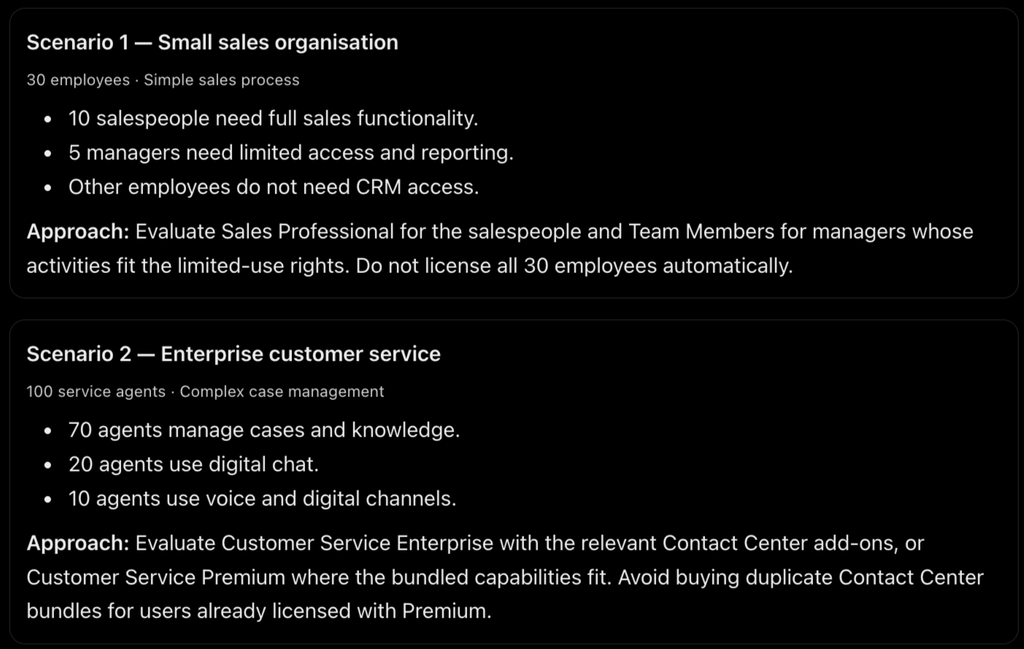
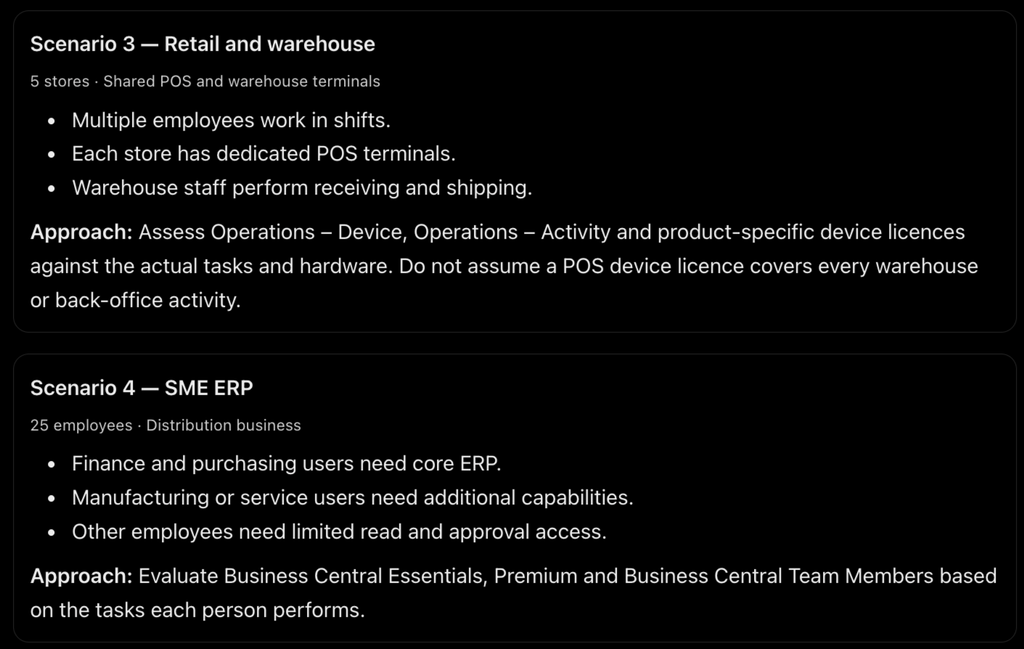
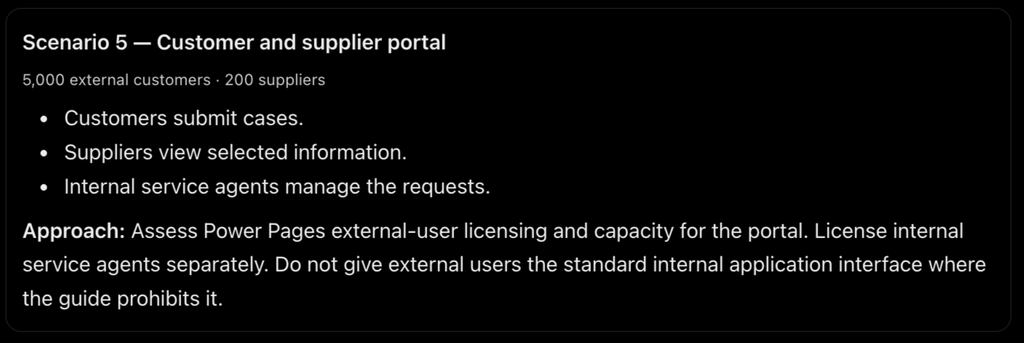
A simple licensing assessment process
Before buying Dynamics 365 licences, follow these steps.
- List the applications: Identify whether the business needs Sales, Customer Service, Field Service, Business Central, Finance, Supply Chain Management or other products.
- List the users: Count users by job function, not just department or employee count.
- Understand what each person does: Identify whether they create, update, approve, manage, read or administer business records.
- Choose the appropriate licence: Compare full user, Team Members, Operations – Activity, device and external-user options.
- Check Base and Attach eligibility: For people using multiple Dynamics 365 applications, verify the highest-priced base licence and eligible attach combinations.
- Calculate additional costs: Include Power Platform, storage, AI credits, environments, integrations and other add-ons.
- Validate before procurement: Check the latest licensing guide, Product Terms, regional prices and contract conditions.
Licensing review checklist
- Have we identified all Dynamics 365 applications?
- Have we mapped users to their actual business activities?
- Have we checked Team Members eligibility?
- Have we assessed Operations – Activity where relevant?
- Have we checked device licensing for shared devices?
- Have we verified base and attach combinations?
- Have we assessed contractors and external users correctly?
- Have we checked indirect access and multiplexing?
- Have we estimated Dataverse and other storage?
- Have we assessed Copilot Credits and AI consumption?
- Have we included Power Apps, Power Automate and Power Pages?
- Have we included development and non-production requirements?
- Have we checked local prices, taxes, minimum purchases and discounts?
- Have we obtained written confirmation for complex scenarios?
What should an enterprise licensing cost model include?
A useful commercial model should not just calculate the subscription cost.
| Cost category | Example |
|---|---|
| Application licences | Sales, Customer Service, Finance |
| Additional licences | Attach, Team Members, Operations – Activity |
| Device licences | POS, warehouse, shared devices |
| Platform services | Power Apps, Power Automate, Power Pages |
| Capacity | Dataverse, Business Central database, other storage |
| AI | Copilot Credits, Copilot Studio consumption |
| Infrastructure | Azure Functions, API Management, Service Bus |
| Implementation | Consulting, customisation, migration |
| Operations | Support, monitoring, governance and training |
The total cost of ownership should be forecast over three to five years, including user growth, capacity growth, renewals and changes to commercial terms.
Official Microsoft references
Microsoft Dynamics 365 Licensing Guide
November 2026 · 95 pages · Official Microsoft document Open the complete Dynamics 365 Licensing Guide
Additional useful references:
- Power Platform licensing and billing
- Power Automate licence types
- Dynamics 365 pricing
- Business Central pricing
- Microsoft Product Terms
 Satya Karki