
Background
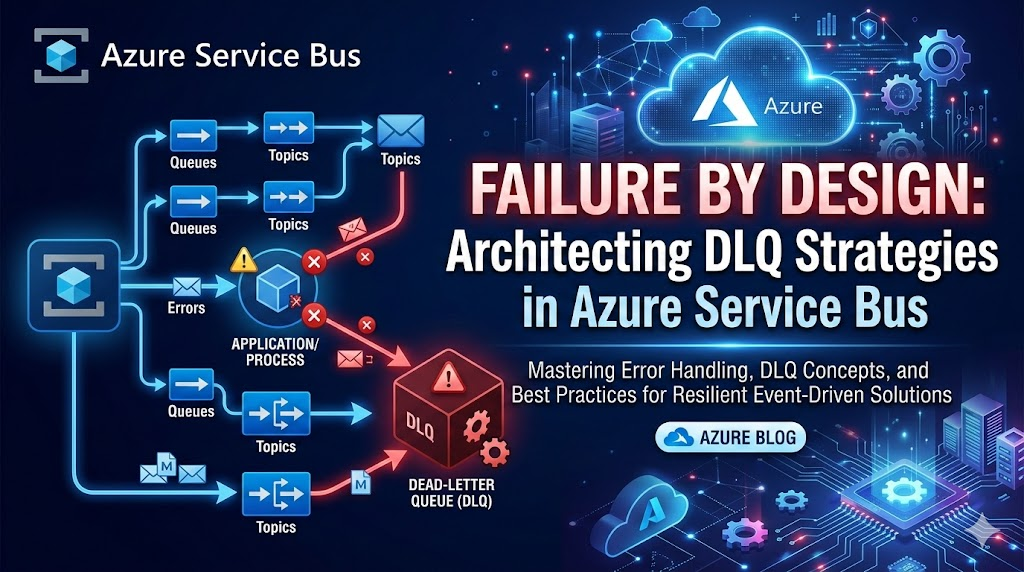
In distributed systems, failure is not an exception — it’s a certainty.
When building cloud-native solutions on Azure—especially event-driven or message-based systems—we rely heavily on asynchronous communication. Services publish messages, downstream services consume them, and the system scales independently.
But what happens when:
- A message is malformed?
- A downstream API is unavailable?
- Business validation fails?
- A consumer crashes repeatedly for the same message?
Without a safety mechanism, you risk:
- Infinite retry loops
- Data loss
- System congestion
- Invisible failures
This is where Dead Letter Queues (DLQ) come in.
Introduction – What is a DLQ?
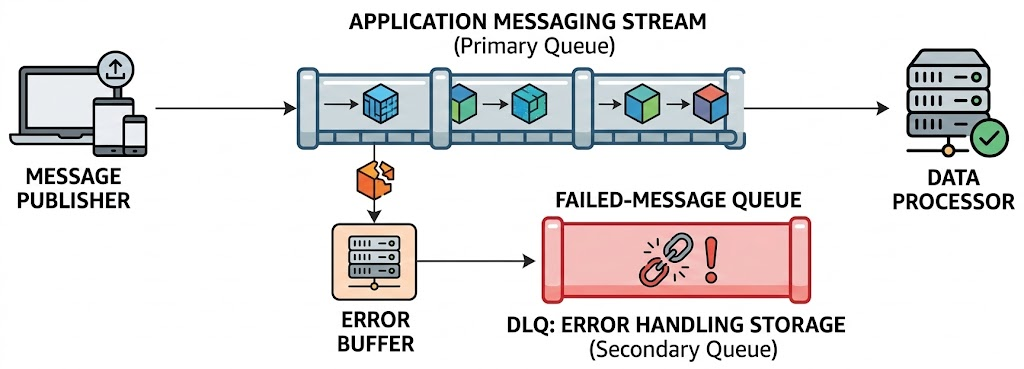
A Dead Letter Queue (DLQ) is a special sub-queue used to store messages that cannot be successfully processed after maximum retry attempts or validation failures.
In Azure messaging services like:
- Azure Service Bus
- Azure Storage Queues
- Azure Event Grid
- Azure Event Hubs
DLQ acts as a quarantine zone for problematic messages.
Think of DLQ as:
“The ICU ward of your messaging architecture.”
Messages are not discarded — they are isolated for diagnosis and recovery.
Why DLQ is Needed (Architectural Justification)
From a Senior Architect perspective, DLQ is not optional in enterprise systems.
Prevents System Blocking
Without DLQ:
- Poison messages block the queue.
- Throughput collapses.
- Scaling doesn’t help.
With DLQ:
- Problematic messages are isolated.
- Healthy traffic continues.
Supports Reliability Patterns
DLQ supports:
- Retry pattern
- Circuit breaker pattern
- Compensating transaction
- Saga orchestration
- Idempotency strategies
Enables Observability & Governance
DLQ helps answer:
- Which messages are failing?
- Is it a code issue or data issue?
- Is a partner API causing failures?
- Is there fraud or malformed payload injection?
Regulatory & Enterprise Audit Needs
In finance, healthcare, and government:
- You cannot lose transactions.
- You must prove why a message failed.
- You must support replay.
DLQ provides that safety net.
How DLQ Works in Azure Service Bus
In Azure Service Bus:
- Each Queue and Subscription automatically has a DLQ.
- It’s a sub-path: <queue-name>/$DeadLetterQueue
Messages are dead-lettered when:
- MaxDeliveryCount exceeded
- TTL expired
- Explicitly dead-lettered by code
- Filter rule exception
- Header size limit exceeded
Connected Azure Services
DLQ typically integrates with:
| Service | Role |
|---|---|
| Azure Service Bus | Messaging backbone |
| Azure Functions | DLQ processor |
| Azure Monitor | Alerting |
| Application Insights | Failure telemetry |
| Azure Logic Apps | Manual remediation |
| Azure Storage | Archive |
| Azure SQL / Cosmos DB | Audit store |
Real Enterprise Use Cases
Financial Payment Processing
Scenario:
- Payment event published.
- Downstream fraud service fails validation.
- Message dead-lettered.
Architectural flow:
- DLQ processor flags for manual review.
- Business team validates.
- Message replayed.
Healthcare Data Integration
Considering your experience with US healthcare CSV and XML transformations:
- Malformed healthcare record
- Schema validation failure
- Regulatory rule violation
DLQ stores:
- Original payload
- Validation reason
- Timestamp
- Correlation ID
Prevents data loss and compliance violations.
E-Commerce Order Orchestration
- Order event triggers inventory + payment + shipping.
- Payment service timeout.
- After retry exhaustion → DLQ.
- Compensating action triggered.
Enterprise Solution Architecture Design
High-Level Architecture
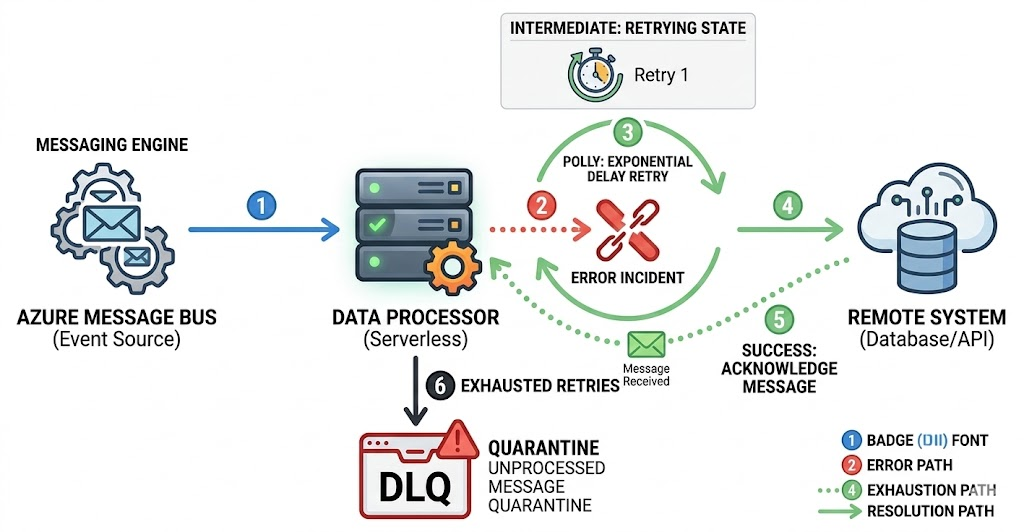
Producer Service
        ↓
Azure Service Bus Queue/Topic
        ↓
Consumer Service
        ↓
Dead Letter Queue
        ↓
DLQ Processor Service
        ↓
Audit + Monitoring + Replay
Recommended Architecture Sections (Senior Perspective)
When designing DLQ, include:
Failure Categorization
- Transient
- Business validation
- Schema error
- Dependency failure
Not all DLQ messages should be replayed automatically.
Retry Strategy
- Immediate retries (3–5)
- Exponential backoff
- MaxDeliveryCount aligned with SLA
Monitoring Strategy
- Alert when DLQ count > threshold
- Alert on DLQ growth rate
- Monitor replay attempts
Replay Strategy
Options:
- Manual replay
- Automated replay
- Fix and requeue
- Move to archive
Governance & Security
- RBAC access to DLQ
- Mask PII in logs
- Encrypt sensitive payload
How to Implement DLQ in .NET 10
Using:
- .NET 10
- Azure.Messaging.ServiceBus SDK
Step 1 – Install Package
dotnet add package Azure.Messaging.ServiceBusStep 2 – Send Message
var client = new ServiceBusClient(connectionString);
var sender = client.CreateSender("orders-queue");
await sender.SendMessageAsync(new ServiceBusMessage(orderJson));
Step 3 – Process with MaxDeliveryCount Configured
In Azure Portal:
- Set Max Delivery Count (e.g., 5)
Consumer:
var processor = client.CreateProcessor("orders-queue");

processor.ProcessMessageAsync += async args =>
{
    try
    {
        var body = args.Message.Body.ToString();

        // Simulate business validation failure
        if(body.Contains("Invalid"))
        {
            await args.DeadLetterMessageAsync(
                args.Message,
                "BusinessValidationFailed",
                "Order contains invalid data");
            return;
        }

        await args.CompleteMessageAsync(args.Message);
    }
    catch (Exception)
    {
        throw; // automatic retry
    }
};
Step 4 – Read from DLQ
var receiver = client.CreateReceiver(
    "orders-queue",
    new ServiceBusReceiverOptions
    {
        SubQueue = SubQueue.DeadLetter
    });

var messages = await receiver.ReceiveMessagesAsync(10);

foreach (var message in messages)
{
    Console.WriteLine($"DeadLetter Reason: {message.DeadLetterReason}");
    Console.WriteLine($"Description: {message.DeadLetterErrorDescription}");
}
Advanced Enterprise Pattern – DLQ Processing Microservice
Recommended:
- Dedicated DLQ Processor
- Idempotent replay logic
- Observability integration
- Circuit breaker before replay
Example:
DLQ → Validate → Transform → Requeue → Log → MonitorOperational Best Practices
✔ Never ignore DLQ
✔ Monitor growth trend
✔ Don’t auto-replay blindly
✔ Store correlation IDs
✔ Track failure metrics
✔ Include DLQ in DR strategy
Common Anti-Patterns
❌ No DLQ monitoring
❌ Infinite retry loops
❌ Auto-replay without root cause
❌ No audit trail
❌ Sharing DLQ access with all developers
Final Thoughts
DLQ is not just a technical feature.
It is:
- A resilience strategy
- A compliance enabler
- A diagnostics tool
- A governance checkpoint
- A business continuity mechanism
In enterprise Azure architectures — especially financial, healthcare, and mission-critical workloads — DLQ is mandatory.
When designing event-driven systems:
“If you don’t design for failure, failure will design your outage.”